

What if your accounting team could reclaim twenty hours every single week without hiring a single new staff member? Most B2B leaders accept manual data entry and slow reconciliation cycles as the inevitable friction of growth, but these inefficiencies do more than just waste time. They actively drain your profit margins and obscure your true financial health. Implementing a robust QuickBooks integration for B2B ecommerce is no longer just a technical upgrade; it’s a strategic necessity for protecting your cash flow and maintaining a competitive edge in 2026.
You’ve likely felt the frustration of disconnected inventory or the sting of high interchange fees on large wholesale orders. We understand that your business requires a tailored approach rather than a generic solution. In this guide, you’ll learn how to eliminate manual entry and automate your workflows through seamless payment integration. We will explore how to achieve automated daily reconciliation and lower your transaction costs by capturing Level 3 data. This transition ensures you have the real-time visibility needed to make confident, data-driven decisions for your company’s future. Our methodical look at these systems will provide the clarity you need to bridge the gap between your sales platform and your ledger.
Key Takeaways
- Understand how a bidirectional data bridge eliminates manual entry errors and accelerates reconciliation cycles by connecting your ecommerce platform directly to your ledger.
- Learn the technical essentials of data mapping, including how to sync SKUs, tax codes, and shipping methods to ensure your financial records remain accurate and consistent.
- Discover how QuickBooks integration for B2B ecommerce automatically captures Level 2 and Level 3 data to significantly reduce interchange fees on high-volume wholesale transactions.
- Evaluate the security and scalability of native versus third-party integration strategies to identify the most resilient architecture for your specific business needs.
- See how a consultative approach to payment integration helps manufacturers and distributors protect their cash flow through specialized data capture and automated workflows.
The Impact of QuickBooks Integration for B2B Ecommerce
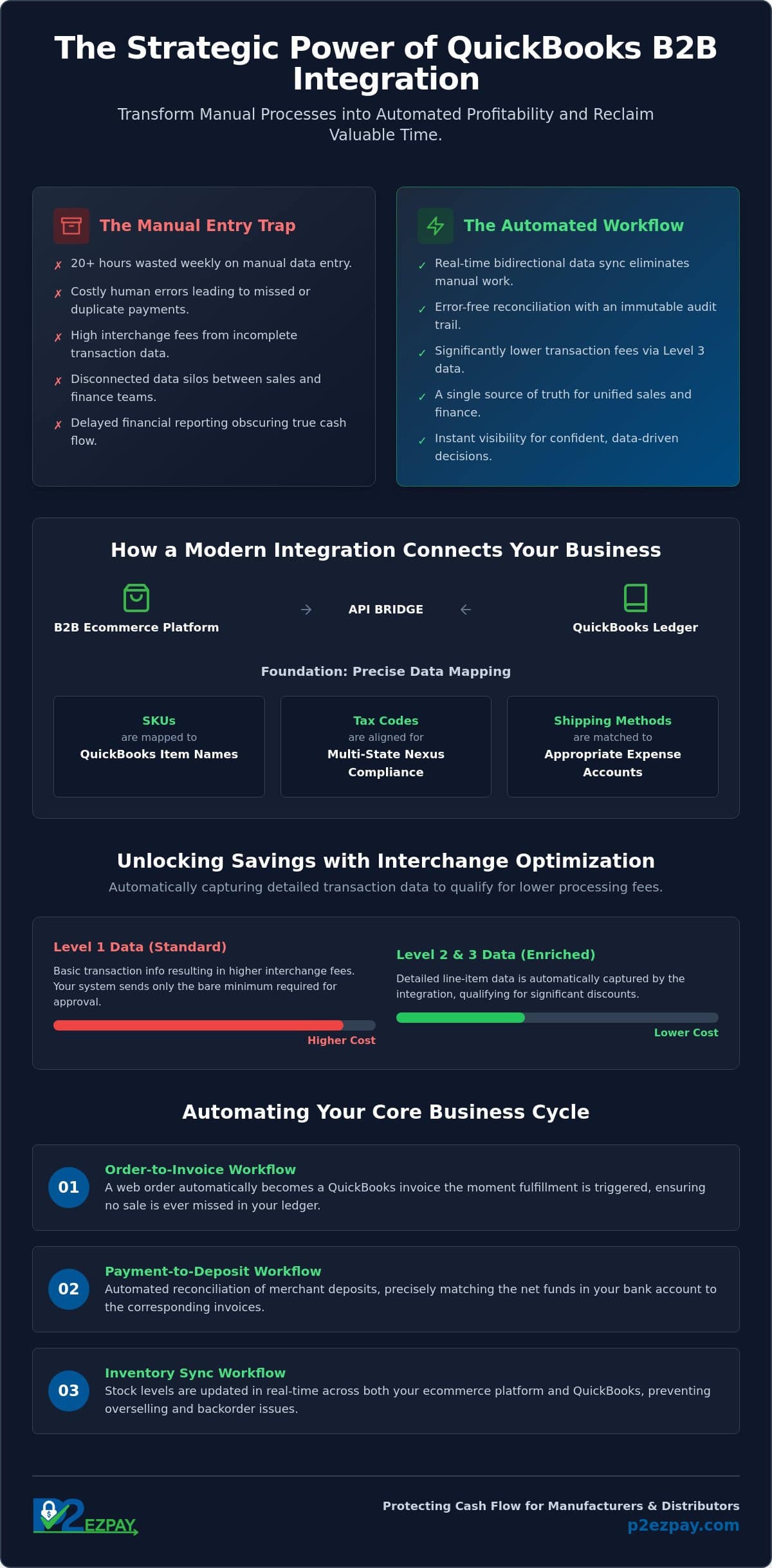
A sophisticated QuickBooks integration for B2B ecommerce serves as a bidirectional data bridge, ensuring that information flows seamlessly between your digital storefront and your financial ledger. For many Milwaukee distributors, manual reconciliation has evolved into a significant growth killer. When staff members spend hours cross-referencing spreadsheets, they aren’t just losing time; they’re creating opportunities for data silos and costly discrepancies. By 2026, the industry has shifted away from basic shopping carts toward comprehensive B2B portals that demand deep financial connectivity. This evolution allows for an immutable audit trail, protecting your accounting integrity while providing the transparency required for modern corporate governance. With the recent shift to metered API reading fees, having a strategic partner to manage these connections is essential to keep operational costs predictable.
Eliminating the “Manual Entry” Trap
The hidden cost of human error in B2B invoice posting often manifests as missed payments or duplicate entries that can take weeks to resolve. Depending on your transaction volume, you might choose between real-time processing for immediate visibility or batch processing to simplify end-of-day reporting. Automation doesn’t just reduce mistakes; it reallocates your accounting team’s energy toward strategic financial analysis rather than clerical data entry. This is particularly vital when managing complex interchange fees, as integrated systems can automatically categorize data to secure better rates. By removing the manual bottleneck, you ensure that your financial data is ready for an audit at any moment without the typical end-of-month scramble. For a structured approach to eliminating these inefficiencies, our QuickBooks automated payment posting checklist for 2026 provides a step-by-step framework for accelerating your invoice-to-cash cycle.
Bridging the Gap Between Sales and Finance
Efficient B2B payment processing requires that sales and finance teams operate from a single source of truth. Bidirectional sync is the simultaneous update of sales and accounting ledgers, ensuring that a change in one system is immediately reflected in the other. This connectivity allows sales representatives to view real-time credit limits and custom pricing tiers during the negotiation process, preventing over-extension and ensuring contract compliance. When your QuickBooks integration for B2B ecommerce is configured correctly, it creates a unified environment where customer profiles and historical data are always accessible and accurate. This level of transparency fosters a stronger partnership between departments and provides a more professional experience for your wholesale clients.
How Modern B2B Payment Integrations Work
The Application Programming Interface (API) serves as the digital translator that allows your ecommerce platform and accounting software to communicate in real time. Since the introduction of the App Partner Program in July 2025, Intuit has moved to a metered system for data retrieval. This change means that a high-quality QuickBooks integration for B2B ecommerce must be architected for efficiency, ensuring that data read operations stay within cost-effective tiers while maintaining a steady flow of information. While QuickBooks Online utilizes a continuous cloud-to-cloud connection, QuickBooks Desktop relies on local sync logic that often requires a dedicated hosting environment or a secure web connector to bridge the gap between your warehouse and your ledger. For firms that depend on the robust accounting capabilities of the desktop version, a purpose-built QuickBooks Desktop payment integration can automate these workflows and eliminate the manual reconciliation that slows down growing distributors.
Successful data mapping is the foundation of this bridge. It involves connecting your web-based SKUs to QuickBooks Item Names, aligning regional tax codes for multi-state nexus compliance, and matching shipping methods to appropriate expense accounts. In complex B2B scenarios, the integration must handle split shipments and backorders without creating duplicate invoices. If an order is partially fulfilled, the system should automatically update the sales order in QuickBooks while keeping the remaining balance open for future fulfillment. This level of precision prevents the “data drift” that often plagues growing distributors.
The Anatomy of a Successful Sync
A robust integration automates three critical transitions within your business cycle. First, the order-to-invoice workflow ensures that a web order becomes a QuickBooks invoice the moment fulfillment is triggered. Second, the payment-to-deposit workflow automates the reconciliation of merchant deposits, matching the net funds in your bank account with the gross sales in your ledger. Finally, the inventory-to-web sync keeps your storefront accurate. If you sell out of a product in your physical warehouse, the integration updates your B2B portal instantly, preventing the frustration of unfulfillable orders and preserving your professional reputation.
Handling B2B Specific Payment Workflows
B2B transactions rarely follow a simple “pay-now” model. Your integration must be flexible enough to track “Net Terms” and Buy Now, Pay Later (BNPL) arrangements, reflecting these as accounts receivable rather than immediate cash sales. It should also manage partial payments and deposit requirements for custom manufacturing orders. Utilizing ACH payment services is a strategic way to handle these large-scale wholesale transactions at a lower cost than traditional credit cards. If you are struggling to map these intricate financial paths, you may wish to speak with a payment architect who can design a bespoke workflow for your specific operational needs.
Interchange Optimization: The Secret Benefit of Integration
While the convenience of automated data entry is often the primary motivator for seeking a QuickBooks integration for B2B ecommerce, the most significant financial impact frequently comes from a less visible source: interchange optimization. Most business owners are aware that card networks charge fees for every transaction, but few realize that these costs aren’t fixed. When you use a standalone terminal or a basic “keyed-in” payment method, the transaction lacks the granular detail that card brands like Visa and Mastercard require to verify a corporate or government purchase. Without this data, the transaction is downgraded to a higher cost tier, effectively costing you thousands of dollars in unnecessary fees every year. Moving beyond a standalone terminal isn’t just about speed; it’s about ensuring every transaction qualifies for the lowest possible rate.
Lowering B2B Interchange Fees in 2026
To qualify for the lowest possible rates, B2B transactions must include Level 2 and Level 3 data. This includes specific details such as the customer’s tax ID, destination zip code, and itemized line-item descriptions like quantities and unit prices. Manually entering this information for every wholesale order is practically impossible for a busy accounting team. However, a properly configured QuickBooks integration for B2B ecommerce pulls these fields directly from your digital sales records and passes them to the card networks automatically. Level 3 processing can reduce B2B transaction costs by up to 1%. By providing this data-rich environment, you demonstrate a lower risk profile to the banks, which rewards your business with significantly lower interchange rates.
Maximizing Profitability on High-Volume Orders
Consider the experience of a Milwaukee manufacturer who recently transitioned from a manual payment process to an integrated system. Before the shift, they were paying flat-rate fees on large wholesale orders, often exceeding 2.9% per transaction through native tools. By moving to an integrated model that captures Level 3 data, they secured interchange-plus pricing that was 20% to 30% lower than their previous flat-rate costs. While native QuickBooks Payments offers convenience for smaller firms, high-volume businesses often find that the flat-rate structure becomes a liability as they scale. Businesses processing large order volumes should explore high volume merchant services designed to capture Level 3 interchange savings and prevent the account freezes that can disrupt operations during peak periods. Choosing specialized B2B payment processing allows you to keep more of your margin on every shipment. This strategic approach ensures your payment architecture is built for profitability rather than just simple connectivity, allowing you to reinvest those savings back into your company’s growth.
Choosing the Right QuickBooks Integration Strategy
Selecting a QuickBooks integration for B2B ecommerce requires a careful balance between out-of-the-box convenience and the technical flexibility your specific industry demands. While native tools are often marketed as a universal solution, they frequently don’t provide the depth needed for complex wholesale workflows. Third-party middleware or custom-built connectors often provide a more resilient architecture for high-volume operations processing 1,000 or more orders per month. Security remains the cornerstone of this decision. Ensuring your stack maintains rigorous PCI compliance and utilizes robust data encryption protects your business from the catastrophic reputational damage of a data breach. For Wisconsin-based businesses, having a local partner who understands the regional manufacturing and distribution landscape adds a layer of accountability that distant software providers simply cannot match.
Integration Red Flags to Avoid
Many off-the-shelf solutions rely on one-way syncs that only push data from the storefront to the ledger. This often leaves “ghost” orders in your system if a customer cancels or modifies a purchase on the web portal. You should also be wary of integrations that lack support for multiple currencies or complex tax jurisdictions, which can lead to significant errors as you expand into new markets. Perhaps the most frustrating trap is the hidden per-transaction sync fee. These small costs might seem negligible at first, but they’ll quickly erode your profit margins as your order volume scales. It’s about ensuring your technology stack supports your growth rather than taxing it.
The Role of a Merchant Services Advisor
Navigating these technical nuances is precisely why a merchant services advisor is critical during the initial setup phase. An expert can help you optimize a QuickBooks integration for B2B ecommerce for both Desktop and Online environments, ensuring your payment gateway and accounting software are perfectly aligned. This consultative approach prevents the “plug-and-play” failures that often result in hours of manual cleanup later. For a deeper look at the specific tools available, you may find our guide on The Best Payment Processor for QuickBooks in 2026 helpful. If you’re ready to build a more efficient financial foundation, we invite you to contact our team for a tailored consultation today.
Streamlining Your B2B Workflow with P2EZPay
Technology is a powerful tool, but software alone cannot solve the nuanced financial challenges of a growing enterprise. At P2EZPay, we act as a seasoned mentor and strategic partner, offering a consultative approach to B2B payment architecture that moves beyond simple software connections. We understand that Milwaukee manufacturers and distributors face unique pressures, from managing complex supply chains to protecting slim margins on high-volume orders. By designing a bespoke QuickBooks integration for B2B ecommerce, we ensure that your payment data is not just synced, but optimized for maximum profitability. This involves a deep dive into your current processes to ensure that every transaction is captured with the technical precision required for Level 3 interchange rates.
Our team specializes in creating a seamless bridge between your ecommerce payment processing platform and your back-office ledger. This connectivity is essential for maintaining a single source of truth across your organization. Whether you are operating out of Waukesha, Brookfield, or Madison, our local presence ensures that you have access to expert guidance whenever your workflow requires adjustment. We don’t believe in a generic, one-size-fits-all model. Instead, we focus on building a resilient system that handles the intricacies of wholesale trade, such as partial shipments and custom pricing tiers, while keeping your data secure and your audit trails clean.
A Tailored Approach for Wisconsin Corporations
We begin every partnership by analyzing your existing QuickBooks setup to identify hidden friction points that may be slowing down your reconciliation. If your team is still manually matching deposits or correcting entry errors, you’re losing valuable time that should be spent on strategic growth. Our objective is to refine your QuickBooks integration for B2B ecommerce so that it operates autonomously, even as your transaction volume scales. To support this transition, we recommend reviewing our comprehensive guide on QuickBooks automated payment posting for B2B efficiency in 2026, which outlines the exact steps needed to eliminate manual reconciliation and accelerate your cash flow. We invite you to read our detailed guide on how to automate QuickBooks reconciliation to see how we transform chaotic data streams into organized, real-time financial insights.
Next Steps for Your Business
The path toward a more efficient financial future starts with a clear understanding of your current overhead. We provide a comprehensive B2B payment cost analysis that highlights exactly where unoptimized fees are eroding your bottom line. Following this analysis, you can schedule a workflow audit with a P2EZPay expert to map out a transition plan that minimizes disruption to your daily operations. We’re committed to your long-term success and provide the steady hand needed to navigate the evolving 2026 API landscape. If you’re ready to eliminate manual data entry and secure your profit margins, contact P2EZPay for a custom QuickBooks integration quote and let us help you build a more professional, automated accounting environment.
Securing Your Financial Future Through Automated Precision
Transitioning to a modern QuickBooks integration for B2B ecommerce is more than a technical upgrade; it’s a commitment to your company’s operational excellence. By automating the sync between your storefront and ledger, you eliminate the friction of manual entry while gaining the real-time visibility needed for precise cash flow management. We have explored how capturing Level 3 data can fundamentally lower your transaction costs, turning your payment architecture into a driver of profitability rather than a line-item expense. This strategic shift ensures your business remains resilient in an increasingly digital marketplace.
Choosing a partner with over 30 years of industry experience ensures that your transition is handled with the sophisticated care your business deserves. Our specialized Level 3 processing expertise provides the protection and guidance necessary to navigate the complexities of corporate payments. With local support for Milwaukee and Madison firms, we offer a level of accessibility and loyalty that generic software providers can’t match. If you’re ready to protect your margins and reclaim your team’s time, it’s time to take the next step toward a more efficient workflow.
Automate Your B2B Accounting with P2EZPay and let us help you build a more resilient, scalable financial foundation for the years ahead. We look forward to supporting your continued growth.
Frequently Asked Questions
How does QuickBooks integration reduce B2B transaction fees?
An integration reduces fees by automatically passing Level 2 and Level 3 data points to card networks during the transaction process. When your system provides granular line-item details and customer tax IDs, the transaction is categorized as lower risk by the banks. This allows you to move away from expensive flat-rate pricing and secure interchange-plus rates, which often result in a 20% to 30% reduction in costs for high-volume distributors.
Can I sync my QuickBooks Desktop Enterprise with my B2B ecommerce store?
You can sync QuickBooks Desktop Enterprise using a secure web connector or specialized integration middleware designed for local environments. While Desktop versions don’t have the native cloud connectivity of QuickBooks Online, a hosted server or dedicated sync tool bridges the gap effectively. For a comprehensive walkthrough of your options, our guide on QuickBooks Desktop payment integration for B2B efficiency covers the specific tools and configurations that keep your warehouse inventory and wholesale sales orders perfectly aligned with your digital B2B portal without any manual intervention.
What is the difference between QuickBooks Online and QuickBooks Desktop for B2B payments?
QuickBooks Online offers continuous cloud-to-cloud synchronization, whereas QuickBooks Desktop typically relies on periodic batching or a local web connector. Online versions benefit from immediate API updates, but Desktop Enterprise often provides the more robust inventory features required by large manufacturers. Choosing a QuickBooks integration for B2B ecommerce depends on whether your workflow requires real-time cloud access or the complex reporting found in desktop editions.
Do I need a special merchant account for Level 3 processing in QuickBooks?
You need a merchant account specifically configured for interchange-plus pricing and an integration capable of passing line-item data. Standard consumer-grade accounts often lack the technical fields required for Level 3 qualification. A specialized B2B payment processor ensures your merchant ID is registered to accept and transmit the granular data points that trigger the lowest available corporate and government card rates.
How long does it take to set up a QuickBooks payment integration?
A standard QuickBooks integration for B2B ecommerce typically takes between two and four weeks to fully implement and test. This timeline includes initial data mapping, payment gateway configuration, and a pilot phase to ensure tax codes and SKUs sync correctly. Complex environments with custom pricing tiers or multiple warehouse locations might require additional time to ensure the bidirectional bridge is completely resilient before going live.
Is my data secure when syncing ecommerce sales to QuickBooks?
Your data remains secure through the use of PCI-compliant payment gateways and end-to-end encryption during the sync process. Modern integrations utilize tokenization, which means sensitive credit card information never actually touches your QuickBooks server or ecommerce database. This architecture protects your business from data breaches while maintaining a clear, encrypted audit trail for every transaction your company processes.
Can I manage multiple B2B customer price lists through the integration?
You can manage complex, customer-specific price lists if your integration supports bidirectional data flow between your ledger and storefront. When a member of your team updates a pricing tier in QuickBooks, the integration pushes that change to the B2B portal immediately. This ensures that wholesale clients always see their negotiated rates when they log in, preventing billing discrepancies and preserving your professional relationships.
What happens if a sync fails during a high-volume sales day?
Resilient integration systems utilize error logging and automated retry logic to ensure no data is lost if a sync is interrupted. If a high-volume sales day causes a temporary timeout, the integration queues the transactions and pushes them through once the connection stabilizes. This prevents “ghost orders” and ensures your ledger remains an accurate reflection of your warehouse activity, even during periods of peak demand.