

Why are your most skilled accounting professionals still spending hours every week clicking the “Match” button in QuickBooks? Despite the global B2B payment volume reaching an estimated $180 trillion this year, many firms remain tethered to manual workflows that invite human error. You likely feel the weight of this inefficiency when high-volume ACH or e-check payments fail to sync, leaving your team to untangle mismatched entries. To solve this, you must automate QuickBooks reconciliation through a direct integration bridge rather than relying on standard, disconnected bank feeds.
We believe that true financial efficiency shouldn’t require constant manual intervention. In this guide, you’ll discover the exact steps to eliminate manual data entry and synchronize your corporate payments for flawless, automated reconciliation. We’ll walk through the transition to a zero-touch accounts receivable process, showing you how to achieve real-time financial visibility while significantly reducing your department’s overhead. By the end of this article, you’ll have a clear roadmap to transform your reconciliation from a weekly chore into a seamless background process.
Key Takeaways
- Shift from reactive bookkeeping to proactive financial management by creating a digital handshake between your payment processor and general ledger.
- Discover how to automate QuickBooks reconciliation using Level 2 and Level 3 data to ensure every transaction matches your records without manual intervention.
- Follow a structured five-step audit to confirm gateway compatibility and properly map your Chart of Accounts for flawless data synchronization.
- Learn why local expertise is a critical asset for Wisconsin manufacturers and distributors when scaling high-volume B2B payment solutions.
- Explore how a tailored QuickBooks Payment Integration can remove operational obstacles and provide your team with immediate financial visibility.
What is Automated QuickBooks Reconciliation and Why Does It Matter?
In the modern corporate environment, automated reconciliation serves as the digital handshake between your payment processor and your general ledger. It represents a fundamental shift from reactive bookkeeping, where you spend days looking backward, to proactive financial management. When you choose to automate QuickBooks reconciliation, you’re not just saving time; you’re securing the integrity of your entire financial ecosystem. By eliminating the lag between a transaction occurring and its appearance in your books, you gain the agility needed to respond to market shifts instantly. This is the cornerstone of a “zero-touch” accounts receivable strategy.
Relying on manual processes creates dangerous data silos and leaves significant gaps in your audit trails. Without real-time synchronization, your cash flow visibility is always delayed, making it difficult to make informed strategic decisions. Automated reconciliation is a system where transaction data and bank deposits are auto-matched via integrated APIs, ensuring that your books reflect reality at all times. Understanding the foundational Bank reconciliation process is the first step toward evolving your department into a modern, high-efficiency unit. This transition protects your business from the fatigue that often leads to overlooked discrepancies during manual “matching” sessions.
The Cost of Manual Data Entry for B2B Firms
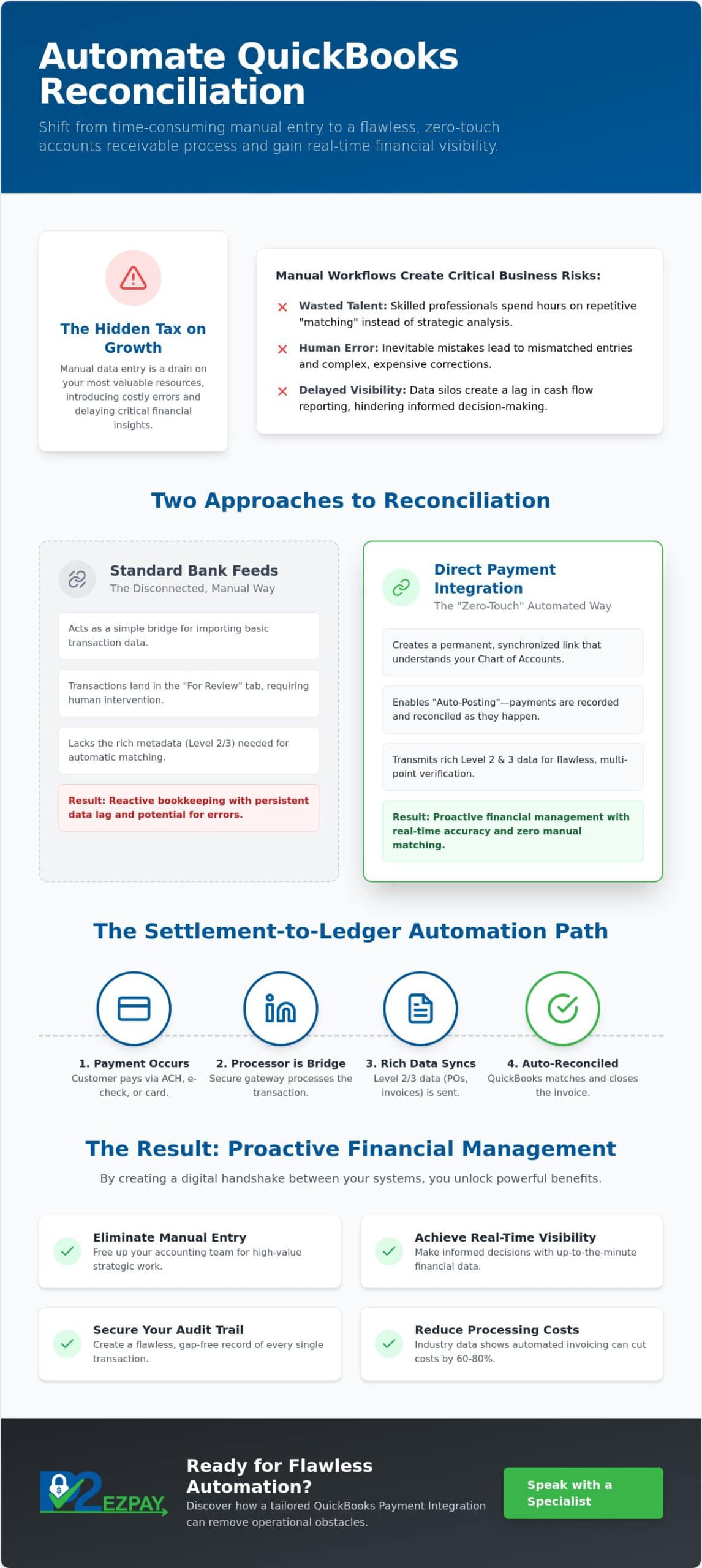
Administrative hours spent on manual entry function as a hidden tax on your business growth. These hours represent talent that could be focused on revenue-generating strategy rather than repetitive, clerical tasks. For high-volume merchants in Madison and Milwaukee, these scaling challenges are particularly acute. Industry data indicates that automated invoicing can reduce processing costs by 60% to 80%, a margin that directly impacts your bottom line. In Wisconsin’s industrial sectors, where high-volume ACH and e-check payments are standard, the labor required to maintain accuracy increases exponentially with every new contract. Reclaiming this time allows leadership to explore new digital channels; for instance, you can visit eComQB to discover advanced revenue strategies for eCommerce brands.
Bank Feeds vs. Direct Payment Integration
Many businesses assume that connecting a standard bank feed is sufficient for modern needs. However, these feeds often leave transactions sitting in the “For Review” tab, still requiring a human to confirm the match or assign a category. True B2B payment processing integration introduces the concept of “Auto-Posting.” In this model, payments are recorded and reconciled as they happen, moving beyond simple data import into deep software synchronization. While a bank feed acts as a simple bridge for information, a direct integration acts as a permanent, synchronized link that understands the nuances of your specific chart of accounts. This level of precision is essential if you want to automate QuickBooks reconciliation and achieve true “zero-click” financial reporting.
The Mechanism: How Payment Integration Bridges the Gap
The Merchant Service Provider acts as the critical intermediary in your financial data chain, serving as the bridge between the point of payment and your general ledger. To automate QuickBooks reconciliation effectively, your processor must do more than just move money. It must transmit the rich metadata associated with every B2B transaction. This “settlement-to-ledger” path ensures that every high-volume payment is accounted for from the moment it’s authorized until it sits in your business account. By establishing a secure, encrypted bridge between your payment gateway and QuickBooks, you ensure that sensitive corporate data remains protected while moving through the synchronization process.
B2B transactions often carry complex requirements, such as purchase order numbers and specific tax identifiers. When Level 2 and Level 3 processing data flows directly into your accounting environment, the software gains multiple points of reference to verify a transaction. This depth of information is what allows for a degree of precision that standard bank feeds simply can’t match. If you’re unsure whether your current setup supports this level of detail, speaking with a specialist can help clarify your options for a more robust integration.
Synchronizing ACH and E-Check Transactions
ACH payments present unique reconciliation challenges because they don’t settle instantly. Without a dedicated integration, your books might show a data gap for several days, leading to confusion regarding actual cash positions. Advanced integration software solves this by tracking the transition from “Pending” to “Settled” status automatically. This real-time visibility is why choosing robust ACH payment services is the foundation for any successful automation strategy. It’s the difference between guessing your balance and knowing it.
Handling Batch Deposits and Merchant Fees
One of the most common frustrations for accounting teams is the discrepancy between gross sales and net deposits. When merchant fees are deducted before funds reach your bank, QuickBooks often fails to find an automatic match, forcing manual intervention. Automated systems address this by identifying the fee component and splitting it into a separate expense account during the sync. By utilizing “Detailed Summary Payouts,” your ledger remains clean. Your bank balance matches your records without the need for manual adjustments or complex spreadsheets. This methodical approach to fee management ensures that your financial statements are always audit-ready and accurate.
5 Steps to Automate Your QuickBooks Reconciliation Workflow
- Step 1: Audit your current payment gateway. Confirm that your gateway offers a native API or direct plugin for QuickBooks. If your processor lacks this compatibility, you’ll remain stuck in a cycle of manual exports and imports.
- Step 2: Map your Chart of Accounts. Payments must land in the correct categories to avoid reconciliation errors. Ensure your software knows exactly which ledger account corresponds to each payment type.
- Step 3: Enable “Auto-Match” rules. QuickBooks can identify recurring B2B clients by their transaction patterns. By setting these rules, the software handles the bulk of the “Match” clicks for you.
- Step 4: Implement a direct integration bridge. Bypassing manual bank file uploads is the only way to achieve real-time visibility. This bridge ensures that as soon as a payment settles, the record is updated in your books.
- Step 5: Schedule a weekly “Review Only” session. Even the best automation benefits from a human eye. Shift your team’s role from data entry to data verification, spending thirty minutes a week confirming the system’s accuracy.
Mapping Your Chart of Accounts Correctly
Correct mapping is the primary defense against the fear of duplicate entries. You should set up dedicated accounts for “Undeposited Funds” and “Merchant Fees” to ensure that gross and net amounts are handled with precision. When transactions are routed correctly from the start, the reconciliation process becomes a simple confirmation rather than a forensic investigation. If you’re managing complex B2B contracts, consulting a merchant services advisor for your initial configuration can prevent costly mistakes in your ledger structure.
Setting Up Advanced Bank Rules
Advanced bank rules allow you to use “If/Then” logic to categorize transactions automatically based on the vendor name or dollar amount. For trusted, high-volume B2B partners, you can implement “Auto-Confirm” rules that bypass the review tab entirely. This level of automation is particularly useful for predictable monthly retainers or standardized ACH transfers. Bank rules are the final safety net for automated reconciliation, catching the nuances that standard software settings might miss. For wholesale and distribution businesses operating online, exploring a dedicated QuickBooks integration for B2B ecommerce can further streamline how these rules interact with your digital sales channels.
Best Practices for Wisconsin Businesses Scaling B2B Payments
Wisconsin’s industrial backbone relies on precision and reliability. For manufacturers and distributors across the Milwaukee area, scaling operations often reveals cracks in manual accounting workflows. When you move to automate QuickBooks reconciliation, the regional context matters as much as the technical specifications. Local firms face distinct challenges, from managing multi-state tax nuances to coordinating high-volume shipments that require immediate payment confirmation. A generic, one-size-fits-all solution often fails to account for these operational intricacies, leading to friction in the ledger and delayed reporting.
Choosing a local partner provides a “Steady Hand” that automated help desks simply cannot replicate. While a global call center might offer a script, a seasoned mentor understands the specific rhythm of the Wisconsin business landscape. This proximity ensures that if a synchronization error occurs, you have access to experts who prioritize your uptime. This relationship-focused model fosters long-term trust, ensuring your financial infrastructure remains as robust as the products you manufacture. It’s an approach grounded in mutual success rather than just a software subscription.
Security and Compliance in Automated Workflows
Maintaining the integrity of your data is paramount as you modernize your systems. In 2026, corporate payment security requires more than just basic encryption. You must ensure all integrated tools are fully PCI-DSS compliant to protect your firm from liability. Tokenization plays a vital role here, replacing sensitive B2B payment data with unique identifiers during the sync process. This ensures that even if data is intercepted, it remains useless to unauthorized parties. For businesses in Waukesha and Brookfield, personalized security audits can identify specific vulnerabilities in your current data chain, providing a layer of protection tailored to your local operations.
Choosing the Right Partner for QuickBooks Integration
The landscape of accounting software is shifting, with a heavy emphasis on cloud-based solutions. When evaluating a processor, you must verify their technical support for both legacy systems and modern platforms. While many are moving toward QuickBooks Online, some larger Wisconsin firms still rely on the robust features of QuickBooks Enterprise. For those firms, a purpose-built QuickBooks Desktop payment integration can be the key to eliminating manual reconciliation while slashing interchange fees through Level 3 data capture. You should also consult The Best Payment Processor for QuickBooks in 2026 to see how different providers stack up in terms of B2B efficiency. If you’re ready to modernize your workflow with a partner who understands your community, reach out to our team today to discuss a bespoke integration strategy that fits your unique business needs.
Achieving Flawless Automation with P2EZPay
P2EZPay acts as the seasoned mentor your accounting department needs to navigate the complexities of modern financial technology. We understand that the ultimate goal isn’t just to install new software; it’s to remove the persistent friction that slows your corporate growth. Our QuickBooks Payment Integration is designed as a bespoke solution that bridges the gap between your daily operations and your final financial reports. By choosing a partner that prioritizes human connection alongside technical proficiency, you ensure that your team is never left to troubleshoot a critical synchronization error alone.
Moving from manual labor to strategic financial oversight allows your CFO and controllers to focus on high-level analysis and long-term planning. When you automate QuickBooks reconciliation through our integrated bridge, you aren’t just checking a box on a digital checklist. You’re building a foundation for stability and scalability that survives the shift toward a “zero-touch” accounting environment. We provide the guidance and protection necessary to move through this transition with total confidence, acting as a steady hand that guides your department toward a more efficient future.
Tailored B2B Payment Processing
Our approach to B2B payment processing is rooted in both efficiency and cost-effectiveness for high-volume merchants. We recognize that industrial and corporate clients require more than basic transaction handling. By supporting Level 2 and Level 3 data transmission, we help you lower interchange fees while ensuring every transaction carries the rich metadata required for instant matching in your ledger. This focus on transaction efficiency ensures that your corporate clients enjoy a professional, seamless experience while your accounting team maintains flawlessly updated books with minimal effort. Businesses selling wholesale online will find that a purpose-built QuickBooks integration for B2B ecommerce delivers the same level of precision and cost savings directly within their digital storefronts.
Your Local Partner in Financial Growth
Based in Hartland, we remain deeply committed to the success of businesses in Milwaukee, Waukesha, Madison, and the surrounding Wisconsin communities. We believe that accessibility is just as important as technical proficiency in the financial services sector. Our local experts are available to help you “Set and Forget” your reconciliation process, acting as a loyal ally in your journey toward financial maturity. We invite you to schedule a consultation where we can map out a strategy tailored specifically to your chart of accounts and business goals. It’s time to stop clicking “Match” and start leading your industry. Streamline your QuickBooks workflow with P2EZPay today.
Securing Your Competitive Edge in 2026
As the B2B landscape evolves, the gap between payment authorization and ledger reconciliation should effectively vanish. You’ve seen how a direct integration bridge moves beyond simple bank feeds by utilizing Level 2 and Level 3 data to ensure every entry is precise. By following a structured audit and mapping your accounts correctly, your team can pivot from exhausting manual entry to strategic financial oversight. This transition isn’t just about software; it’s about reclaiming time for the high-level decision-making that drives your business forward.
When you choose to automate QuickBooks reconciliation with a partner who understands the Wisconsin market, you gain more than just a technical tool. You gain a seasoned mentor with over 30 years of industry experience and specialized expertise in high-volume processing. Our team provides the local, personalized support that Milwaukee and Madison businesses rely on to maintain stability. We’re ready to act as your steady hand, protecting your financial integrity while removing the obstacles in your path. Let P2EZPay Automate Your QuickBooks Reconciliation and experience the clarity of a truly synchronized workflow. Your journey toward a more efficient, zero-touch future is well within reach.
Frequently Asked Questions
Can I truly automate QuickBooks reconciliation for high-volume B2B transactions?
Yes, you can achieve nearly zero-touch reconciliation by implementing a direct payment integration bridge that bypasses standard bank feeds. This system auto-matches high-volume B2B deposits against open invoices in real-time. It transforms the accounting role from manual data entry to a brief weekly verification session. By choosing to automate QuickBooks reconciliation, you ensure your financial records are always current and audit-ready.
What is the difference between a bank feed and a direct payment integration?
A standard bank feed simply imports transaction history after it clears, often leaving items in the “For Review” tab for manual matching. Direct integration is a proactive synchronization tool that transmits transaction metadata, such as invoice numbers and customer IDs, simultaneously with the payment. This allows the software to match and record entries instantly as they occur. It provides a much deeper level of software synchronization than basic imports.
How do I prevent duplicate entries when automating my QuickBooks sync?
You prevent duplicates by correctly mapping your Chart of Accounts and utilizing the “Undeposited Funds” account as a temporary holding area. When your integration is configured properly, it recognizes existing invoices and applies payments to them rather than creating new sales receipts. Establishing clear logic within your bank rules provides an additional layer of protection. This methodical setup ensures that your ledger remains clean even during high-volume periods.
Will automated reconciliation work with both QuickBooks Online and Desktop?
Modern integration solutions are designed to support both QuickBooks Online and QuickBooks Desktop Enterprise environments. While the cloud-based version uses API connections for seamless updates, Desktop versions often utilize a secure web connector to sync data. It’s vital to choose a processor that maintains technical support for your specific software version to ensure a stable connection. Firms still running Desktop can explore a dedicated QuickBooks Desktop payment integration to automate B2B workflows and capture Level 3 data for lower interchange rates. This flexibility allows businesses to scale without being forced into a specific platform.
How does Level 3 processing data help with QuickBooks reconciliation?
Level 3 processing includes detailed line-item data like purchase order numbers and tax identifiers, which QuickBooks uses to verify matches with high precision. This extra layer of information significantly reduces the chance of mismatched entries in a high-volume B2B environment. Beyond accuracy, this data also helps firms qualify for lower interchange rates on corporate card transactions. It’s a strategic tool for both financial accuracy and operational cost savings.
Is it secure to link my payment processor directly to my accounting software?
Linking your systems is highly secure when you use PCI-DSS compliant integration tools that employ advanced tokenization. This process replaces sensitive credit card or bank account details with unique digital identifiers, ensuring that your actual financial data is never stored within QuickBooks itself. Our secure bridge maintains a protected, encrypted path for all your corporate payment information. This setup provides peace of mind while streamlining your financial workflow.
What happens if a transaction fails to auto-match in QuickBooks?
If a transaction lacks sufficient metadata to auto-match, it simply appears in the “For Review” tab for manual oversight. This ensures that no data is lost or incorrectly categorized without your team’s approval. You can then manually link the deposit to the correct invoice. The system can learn from this action to automate QuickBooks reconciliation for that specific vendor or transaction type in the future.
Do I still need a bookkeeper if I automate my reconciliation process?
You still need a financial professional, but their role evolves from repetitive data entry to strategic oversight and exception handling. Automation handles the clerical heavy lifting, allowing your bookkeeper or controller to focus on cash flow forecasting and financial strategy. This shift reduces the administrative burden on your department while providing more accurate, real-time data for business decisions. It turns your accounting department into a strategic asset.