

What if the very system you rely on for efficiency is quietly draining your bottom line through uncapped transaction fees? If you’re managing high-volume B2B payments, you already know that the convenience of a standard setup often comes at a steep price. You’ve worked hard to build a scalable operation; it’s frustrating when your payment infrastructure fails to keep pace. You’re likely tired of watching profit margins shrink under 1% processing costs and spending hours fixing manual reconciliation errors that should’ve been automated years ago.
This guide will show you how to master QuickBooks ACH integration to slash those per-transaction costs and secure your workflows against the latest 2026 NACHA fraud regulations. We’ll help you discover how to streamline your B2B workflows and eliminate manual data entry through expert integration strategies that prioritize your independence. We’ll explore how to move beyond basic plugins to a sophisticated, automated payment strategy that accelerates your cash flow while keeping your financial data perfectly synchronized and compliant with the newest industry standards.
Key Takeaways
- Learn how connecting your bank directly to your ledger through ACH technology creates a seamless bridge for modern B2B transfers.
- Discover how a strategic QuickBooks ACH integration can help your business avoid the “ease of use” trap and significantly lower transaction fees compared to native default settings.
- Understand the technical nuances of API connections and data synchronization to ensure your records remain accurate without manual intervention.
- Navigate the updated 2026 NACHA security mandates, including critical account validation requirements to protect your corporate payments from fraud.
- Follow a methodical two-step strategy to audit your payment volume and implement a bespoke gateway that aligns with your specific business needs.
What is QuickBooks ACH Integration and Why Does it Matter for B2B?
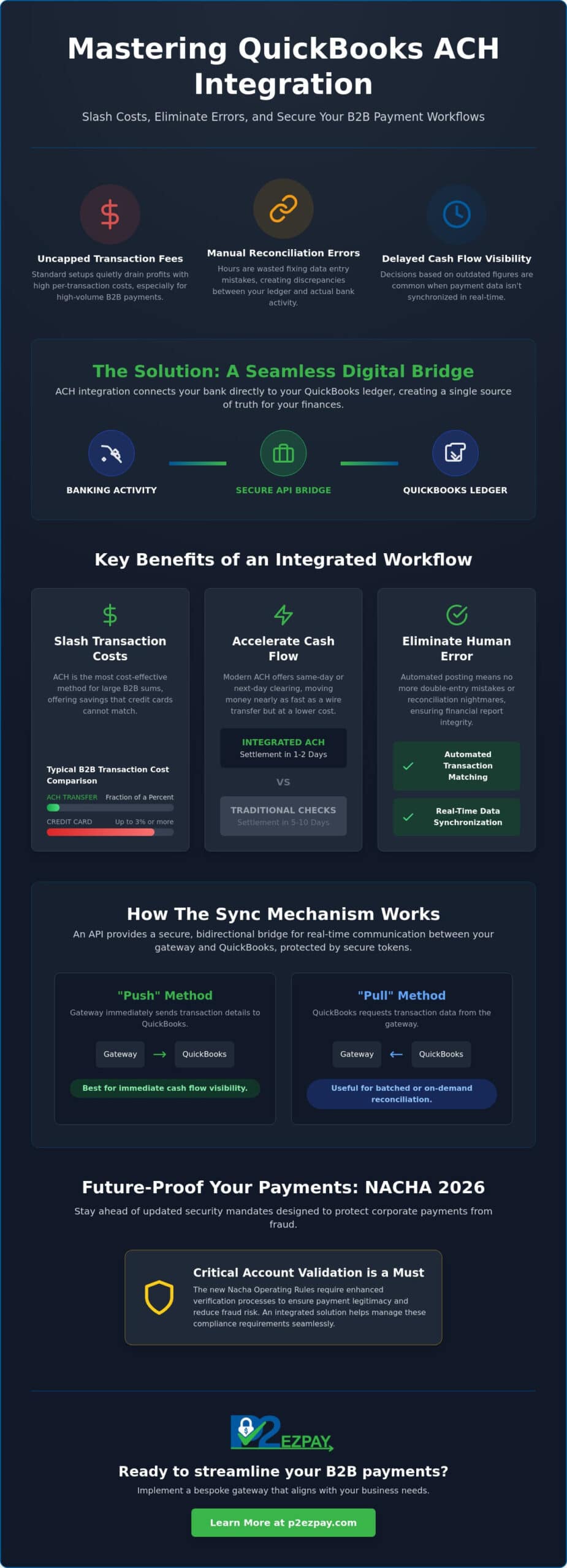
The ACH Network serves as the primary infrastructure for electronic funds transfers in the United States, facilitating trillions of dollars in transactions annually. For modern enterprises, a QuickBooks ACH integration isn’t just a technical convenience; it’s the vital bridge that connects your banking activity directly to your accounting ledger. By automating the flow of data between these two points, you eliminate the friction that often exists between receiving a payment and recording it. This seamless connection ensures that your financial records are always a reflection of your actual bank activity, rather than a lagging approximation.
In the Milwaukee business community, we’ve observed a decisive shift away from the traditional paper check. Local firms—ranging from industrial manufacturers to service-oriented businesses like Prescott’s Laundry—are increasingly abandoning the manual processes of the past to embrace digital efficiency. By integrating these payments directly into QuickBooks, you create a single source of truth for your financial data. This means your records reflect your actual bank balance in real time, providing the clarity needed to make informed strategic decisions. When your accounting software and your payment gateway speak the same language, you gain a level of transparency that’s impossible to achieve with fragmented systems.
This transition toward digital efficiency is seen nationwide, where commercial service leaders like Laundry Breeze rely on robust payment systems to handle the complex billing needs of their diverse client base.
The Evolution of B2B Payments in 2026
Scalability in 2026 requires more than just high volume; it demands real-time data accuracy. The era of the manual “lockbox” and daily bank runs is effectively over for competitive local firms. Modern B2B payment processing now relies on automated triggers that update your books the moment a transaction clears. This evolution allows for precise cash flow forecasting, ensuring you’re never making decisions based on outdated figures. As digital adoption for B2B payments approaches 50%, having a synchronized system is no longer optional for those who wish to maintain a professional edge and manage corporate growth effectively. For firms experiencing rapid expansion, understanding the full scope of high volume ACH processing is essential to keeping pace with both operational demands and tightening NACHA fraud monitoring rules.
Core Benefits of the Integrated Workflow
The primary advantage of a QuickBooks ACH integration is the drastic reduction in human error. When your system handles the posting automatically, the risk of double-entry bookkeeping mistakes or reconciliation discrepancies vanishes. This protection is vital for maintaining the integrity of your financial reports. Beyond accuracy, settlement windows have transformed. Many ACH payment services now offer same-day or next-day clearing, moving money nearly as fast as a wire transfer but at a fraction of the cost. Because ACH remains the most cost-effective method for moving large B2B sums, integrating it into your workflow is a direct investment in your bottom line. It provides a level of cost-efficiency that credit cards simply cannot match for high-value corporate transfers.
How the QuickBooks ACH Sync Mechanism Works
Understanding the technical “handshake” between your financial institution and your accounting software is essential for maintaining a reliable ledger. At the center of a QuickBooks ACH integration is the Application Programming Interface (API). This technology acts as a secure, bidirectional bridge that allows your payment gateway and QuickBooks to communicate in real time. Instead of relying on manual CSV uploads, which are prone to formatting errors, the API ensures that every transaction is transmitted with precision and encrypted protection.
Data synchronization typically follows one of two paths: “Push” or “Pull.” In a “Pull” scenario, QuickBooks initiates a request to the payment gateway to retrieve transaction data. Conversely, a “Push” method occurs when the gateway immediately sends transaction details to QuickBooks the moment a payment is authorized. Most high-volume B2B environments prefer the “Push” method because it provides more immediate visibility into pending cash flow. To maintain the highest security standards, these connections utilize secure tokens. This means sensitive bank account numbers are never stored within your accounting files; instead, a unique digital identifier represents the data, keeping your records compliant with the latest Nacha Operating Rules.
Automated Reconciliation and Posting
The most significant operational relief comes during reconciliation. When an ACH payment clears, the integration automatically identifies the corresponding open invoice and marks it as paid. This process goes beyond simple data entry; the system matches the deposit amount to the specific customer account and job code. If a transaction is returned due to insufficient funds or an incorrect account number, the system can automatically reverse the posting and alert your team. If you’re looking to optimize these workflows, our specialists can help you audit your current setup to ensure every payment maps correctly to your chart of accounts.
QuickBooks Online vs. Desktop Integration
The synchronization experience varies depending on your platform. QuickBooks Online offers a cloud-native environment where updates happen almost instantaneously. For Milwaukee manufacturers and distributors using QuickBooks Desktop Enterprise, the integration is often more robust to handle complex job costing and inventory needs. It’s important to remember that Intuit ceased selling new subscriptions for Desktop Pro and Premier in 2024, leaving Enterprise as the primary desktop solution. Regardless of your version, maintaining 2026 software updates is critical for supporting the advanced API protocols required for modern, secure B2B transfers. Businesses that also sell through digital channels should explore how a dedicated QuickBooks integration for B2B ecommerce can automate reconciliation across both their online storefronts and traditional invoicing workflows.
Native QuickBooks Payments vs. Third-Party ACH Solutions
Many businesses default to native Intuit processing because it’s the path of least resistance during setup. However, for a growing enterprise, this “ease of use” often masks significant long-term costs. While native tools offer immediate connectivity, they frequently lock users into a rigid fee structure that doesn’t scale well with high-volume B2B transactions. Choosing a third-party QuickBooks ACH integration allows you to maintain the software you love while gaining control over the underlying financial rails that move your money.
The primary differentiator between these models is the fee architecture. Native QuickBooks ACH bank transfers currently carry a 1% fee. For accounts opened after September 2023, this fee is uncapped, meaning a single $50,000 invoice could cost your business $500 to process. In contrast, independent providers often offer subscription-based models or capped per-transaction fees. For example, some third-party processors cap ACH fees at less than $10 per transaction, regardless of the total dollar amount. Over a fiscal year, this delta can represent tens of thousands of dollars in reclaimed margin. Businesses processing significant transaction volumes should review a dedicated high volume ACH processing strategy to fully understand how to structure their payment infrastructure for maximum cost efficiency and scalability.
Stability is another critical factor. Native processors often rely on automated risk algorithms that can freeze accounts without warning if they detect a sudden spike in volume. For a B2B firm, a frozen account can halt operations and damage vendor relationships. Partnering with a dedicated merchant services advisor provides a level of human oversight and advocacy that generic call centers simply can’t provide. You gain an ally who understands your business cycle and ensures your “single source of truth” remains accessible and active.
Cost Analysis for High-Volume Merchants
The “hidden tax” of native processing becomes painfully clear when you analyze five and six-figure B2B transfers. If your firm processes $1 million in annual ACH volume at a flat 1% rate, you’re paying $10,000 in fees. A third-party solution with a $5 or $10 cap would reduce that cost to a fraction of the amount. For Milwaukee firms managing tight margins in manufacturing or distribution, these savings are substantial. Transitioning to a flat-fee ACH model provides predictable overhead that percentage-based credit card processing cannot match. Finance leaders looking for a comprehensive approach to reduce transaction costs for B2B can leverage strategies like Level 3 data optimization and automated interchange management alongside ACH adoption to slash overall payment expenses by up to 40%.
Customization and Support
Corporate entities often require custom payment fields, such as specific purchase order numbers or secondary job codes, which native tools frequently lack. A bespoke integration allows for this level of detail, ensuring your data is portable and tailored to your specific workflow. Furthermore, having local, Milwaukee-based support means you aren’t waiting on a global queue when you need to troubleshoot an integration hurdle. This independence ensures that if you ever decide to switch banks, your payment data and historical records remain under your control, not tied to a single proprietary ecosystem. For wholesale and distribution companies managing online ordering portals, a purpose-built QuickBooks integration for B2B ecommerce delivers the same level of customization and data portability across digital sales channels.
Security Standards and NACHA Compliance for 2026
The regulatory landscape for B2B payments has fundamentally shifted in 2026. NACHA, the governing body for the ACH network, has implemented rigorous new fraud monitoring rules that demand a proactive stance from every business originator. Specifically, Phase 2 of the new mandate takes effect on June 19, 2026. This requires all businesses to have risk-based processes in place to detect and prevent fraudulent transfers, including those authorized under false pretenses like vendor impersonation. Ensuring your QuickBooks ACH integration can handle these standardized requirements is no longer just a best practice; it’s a necessity for maintaining your standing within the financial ecosystem.
Account validation is a core pillar of these 2026 updates. Before you initiate the first transfer to a new vendor or partner, you must verify that the bank account is legitimate and active. While ACH transactions don’t technically fall under the same scope as credit card data, following PCI compliance frameworks provides a reassuring layer of safety for your corporate data. By utilizing multi-factor authentication and end-to-end encryption within your payment gateway, you prevent unauthorized access to sensitive routing and account numbers, keeping your financial “single source of truth” secure from external threats.
Fraud Prevention in the Digital Age
Modern B2B fraud often bypasses technical barriers by targeting human psychology through Business Email Compromise (BEC). Integrated systems now utilize AI to analyze transaction patterns in real time, flagging any transfer that deviates from your company’s historical norms. When you implement electronic check processing for business, you should establish a dual-verification process for all bank detail changes. Always confirm updated payment instructions through a secondary, known communication channel before updating your ledger. This human connection, supported by AI pattern recognition, creates a formidable defense against “friendly fraud” and sophisticated impersonation schemes.
Data Sovereignty and Privacy
Protecting your client’s sensitive financial data requires moving away from local storage and toward secure “Vaulting” technology. This process allows you to store account information on high-security, off-site servers, providing a digital firewall between your QuickBooks files and potential breaches. For firms operating in Wisconsin, adhering to state-level data protection expectations is a matter of building long-term corporate trust. A professional QuickBooks ACH integration ensures that your data remains sovereign and private, meeting both federal NACHA mandates and regional privacy standards. If you’re concerned about your current compliance posture, reach out to our advisory team for a comprehensive security audit.
Implementing Your QuickBooks ACH Strategy in Milwaukee
Moving from a theoretical understanding of payment automation to a live execution requires a methodical and deliberate approach. A successful QuickBooks ACH integration is not merely a software installation; it is a strategic alignment of your banking relationships and your internal accounting workflows. By following a structured implementation plan, your firm can transition to a more efficient model while maintaining the stability of your daily operations. This process ensures that your move toward automation is both secure and highly professional.
- Step 1: Audit your current volume. Begin by evaluating your monthly B2B payment count and the total dollar value of those transfers. Understanding your specific needs allows you to select a gateway that offers the best balance of security and cost-efficiency.
- Step 2: Consult with a specialist. Partnering with a B2B payment processing expert helps you identify a gateway that supports the advanced API protocols discussed earlier. This step ensures you aren’t forced into a generic model that fails to meet your technical requirements.
- Step 3: Map your chart of accounts. Work with your accounting team to ensure every ACH entry maps correctly to your ledger. This technical alignment is what creates the “single source of truth” that eliminates manual reconciliation errors.
- Step 4: Conduct a pilot test. Before a full-scale launch, run a small group of transactions with a few trusted vendors. This allows you to verify the data sync and ensure the automated posting triggers are functioning as expected.
- Step 5: Roll out the automated option. Once you’ve confirmed the system’s reliability, introduce the ACH payment option to your entire customer base as a preferred, secure method of transfer.
The Local Advantage: Why Milwaukee Firms Choose P2EZPay
While software giants offer generic solutions, local firms in Brookfield, Waukesha, and Madison often require a more bespoke approach. We understand the specific needs of Wisconsin manufacturers and distributors, providing hands-on support that global call centers cannot match. Our team focuses on creating tailored systems that streamline B2B financial workflows, ensuring your integration is built around your unique business cycle. This local partnership provides a sense of loyalty and accessibility that is vital when managing high-value corporate transfers.
Next Steps for Your Financial Transformation
To minimize disruption, it’s helpful to set a clear timeline for your QuickBooks ACH integration that avoids your busiest month-end or year-end closing periods. Once the technical setup is complete, dedicate time to training your team on the new automated reconciliation features. This ensures everyone understands how to handle exceptions and monitor the real-time cash flow data. Finally, request a detailed cost-benefit analysis from your advisor. By comparing the potential savings against the 1% uncapped fees of native processing, you can clearly justify the strategic switch to a more independent and cost-effective payment infrastructure.
Elevating Your B2B Financial Infrastructure
Modernizing your payment infrastructure is a vital step toward long-term stability and operational growth. By moving beyond the native “ease of use” trap and embracing a tailored QuickBooks ACH integration, your firm gains the precision and security required in the 2026 regulatory environment. You now understand how automated reconciliation can reclaim lost administrative hours and how independent gateways protect your profit margins from uncapped transaction fees. These strategic upgrades do more than just save money; they provide the clarity and data integrity needed to lead your business with confidence. This newfound efficiency often allows business leaders the freedom to pursue curated leisure experiences with The Russell Travel Team (Lightning Travel).
As an independent consultancy with over 30 years of industry experience, we provide objective advice tailored to the specific needs of businesses in Milwaukee and Southeast Wisconsin. We act as your loyal ally, offering the strategic leadership and local support necessary to navigate technical transitions safely. Our team is deeply invested in your success, acting as a steady hand that provides both expert guidance and constant accessibility throughout your financial transformation.
Ready to reclaim your time and secure your bottom line? Speak with a P2EZPay Advisor about your QuickBooks Integration today. We look forward to helping you build a more profitable and automated future.
Frequently Asked Questions
Is QuickBooks ACH integration safe for my business data?
Yes, it’s highly safe when you utilize a system that features end to end encryption and secure tokenization. Modern integrations ensure that sensitive bank details are vaulted on high security servers outside your local files. This setup complies with the latest 2026 security mandates, protecting your firm from unauthorized access. By using a secure API, you maintain a single source of truth without exposing your ledger to external vulnerabilities.
How long does it take for an ACH payment to sync with QuickBooks?
Most ACH payments sync with your records almost instantaneously once the transaction is authorized by the gateway. While the actual funds may take one to two business days to settle in your bank account, the API push mechanism updates your ledger in real time. This ensures your accounts receivable department has immediate visibility into pending cash flow, allowing for more accurate and timely daily financial planning.
Can I use a third-party ACH processor with QuickBooks Online and Desktop?
You can absolutely use a third party processor for QuickBooks ACH integration across both Online and Desktop platforms. While Intuit often highlights its native solutions, independent gateways provide greater flexibility and lower fees for high volume users. These integrations connect via secure APIs to ensure that your data flows seamlessly into your specific version of QuickBooks, including Desktop Enterprise and the latest cloud based Online versions.
What are the NACHA requirements for businesses using ACH in 2026?
The 2026 NACHA rules require all ACH originators to implement risk based fraud monitoring and account validation processes. Phase 2 of this mandate becomes effective on June 19, 2026, and applies to all remaining originators. You must verify vendor bank details and monitor for suspicious patterns, such as vendor impersonation or false pretenses. A professional integration helps automate these compliance checks to keep your business in good standing.
Does ACH integration help with high-volume B2B transaction management?
Integration is essential for high volume B2B management because it eliminates the need for manual data entry and reconciliation. Automated systems can handle hundreds of transfers simultaneously, matching each deposit to its corresponding open invoice. This scalability allows your accounting team to focus on strategic analysis rather than fixing repetitive bookkeeping errors that often plague manual processes. It’s a foundational tool for achieving a zero touch accounts receivable workflow.
How much can I save by switching from credit cards to ACH for B2B payments?
Switching to ACH can save your business thousands of dollars annually by replacing percentage based credit card fees with flat or capped transaction costs. While credit cards often cost 2.5% or more, a third party ACH solution frequently caps fees at a low dollar amount per transaction. This is especially beneficial for large B2B invoices where native 1% uncapped fees would otherwise significantly drain your profit margins.
What happens if an ACH payment is returned or fails in QuickBooks?
If an ACH payment is returned for insufficient funds or an incorrect account number, the integrated system automatically reverses the posting in QuickBooks. Your team receives an immediate alert, allowing them to follow up with the client without searching through bank statements manually. This automated handling ensures that your aging reports always reflect the true status of your outstanding receivables, maintaining the integrity of your financial data.
Do I need a special merchant account for QuickBooks ACH integration?
You do need a merchant account or a payment gateway that specifically supports QuickBooks ACH integration and e-check processing. This account acts as the secure conduit between the ACH Network and your accounting software. Selecting an independent provider allows you to secure a merchant account with more stable underwriting and personalized support, reducing the risk of sudden account freezes that can occur with generic native processors.