

Relying on manual data entry in 2026 isn’t just a slow way to work; it’s a direct threat to your B2B cash flow and accounting integrity. Many organizations still lose countless hours to reconciliation, even though data shows that automated workflows can speed up invoice-to-cash cycles by as much as 25 percent. Implementing QuickBooks automated payment posting is no longer a luxury for high-volume businesses. It’s a strategic necessity to maintain visibility in a market where transaction speeds are accelerating and errors are increasingly costly.
We understand that the transition to automated systems can feel daunting, especially with the shifting landscape of QuickBooks pricing and the limited availability of Desktop versions. You deserve a partner who views your success as a long-term commitment rather than a one-time transaction. This guide will show you how to eliminate manual reconciliation and streamline your B2B cash flow using our comprehensive 2026 efficiency checklist. We will explore the latest integration strategies, how to leverage Level 2 and 3 processing to reduce fees, and the specific steps you can take to ensure your payment workflows are both secure and scalable for the years ahead.
Key Takeaways
- Transition from manual data entry to a real-time environment where merchant gateway data automatically matches and records against open invoices.
- Understand the technical handshake between your payment gateway and accounting software to ensure secure, tokenized ledger updates.
- Follow a structured checklist to identify operational bottlenecks and verify that your corporate gateway is fully compatible with your software version.
- Learn how QuickBooks automated payment posting manages complex B2B scenarios like multi-invoice settlements and credit memos without manual errors.
- Discover the strategic advantage of partnering with a dedicated advisor to tailor your integration for high-volume manufacturing or distribution needs.
What is QuickBooks Automated Payment Posting?
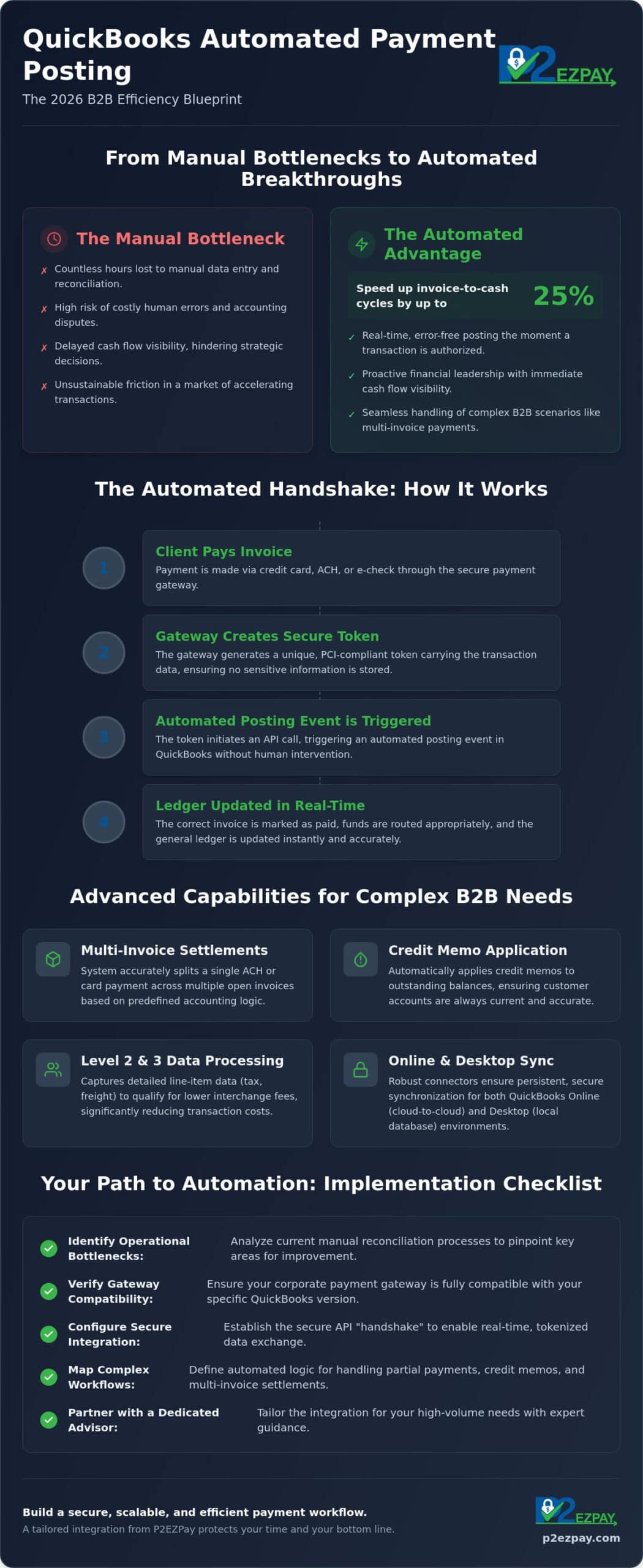
QuickBooks automated payment posting is a technology-driven process where payment data from a merchant gateway is automatically matched and recorded against open invoices within the accounting software. For corporate finance teams, this represents a fundamental shift from manual recording to real-time posting. While manual recording requires a staff member to identify a payment and search for the corresponding invoice, automated posting uses secure tokens to trigger ledger updates the moment a transaction is authorized. Implementing QuickBooks automated payment posting allows teams to move from reactive bookkeeping to proactive financial leadership.
By 2026, maintaining competitive B2B margins requires this level of precision. As Electronic invoicing becomes the standard for nearly 70 percent of B2B transactions, the friction of manual entry is no longer sustainable. Standard QuickBooks Payments offers basic functionality, but third-party automated integrations provide the deeper mapping required for complex corporate needs. These specialized systems handle high-volume data with a level of detail that native solutions often miss, particularly regarding the optimization of Level 2 and Level 3 data to control costs.
The Core Benefits for Milwaukee B2B Firms
Local manufacturers and distributors in the Milwaukee area face unique challenges with high-volume transaction environments. Automated posting significantly reduces human error, ensuring that discrepancies don’t derail your monthly close or lead to accounting disputes. It also provides immediate cash flow visibility, which is essential for effective treasury management and strategic growth. Automated posting is the total elimination of manual reconciliation through API-driven synchronization between your payment gateway and your ledger.
Working with a dedicated merchant services advisor ensures that your integration is tailored to your specific business model. This bespoke approach moves beyond generic software settings to create a reliable, independent financial workflow. It’s about building a system that respects your time and protects your bottom line through sophisticated, transparent technology.
How Automated Payment Posting Works in a B2B Environment
The “handshake” between your payment gateway and accounting software is the engine of modern financial efficiency. When a client pays an invoice, the gateway generates a secure, unique token. This token carries transaction data directly into your ledger, triggering a QuickBooks automated payment posting event without human intervention. This precision is essential to accelerate cash flow, as it removes the traditional lag between receiving funds and updating your books. It’s a reliable, one-to-one mapping that maintains the absolute integrity of your financial records.
B2B transactions are rarely simple. Sophisticated integrations manage the nuances of partial payments and multi-invoice settlements by applying funds based on specific accounting logic. If a client pays three separate invoices with one ACH or e-check transaction, the system splits the payment accurately across the ledger. Credit memos are also applied automatically, ensuring that customer balances remain current. Throughout this cycle, PCI-compliant security protocols protect sensitive data, maintaining a persistent sync that never compromises your network security.
Synchronizing Online and Desktop Environments
By 2026, the functional gap between QuickBooks Online and Desktop automation has narrowed, yet technical differences persist. While Online versions favor cloud-to-cloud API calls, Desktop Enterprise requires a robust connector to handle local database updates effectively. A well-configured sync manages the “Undeposited Funds” account automatically. Instead of payments sitting in a stagnant holding area, they move through to reconciliation in a clean, predictable flow. If you’re navigating these technical requirements for the first time, you might reach out for a consultation to see which environment best supports your volume.
Integrating Level 2 and Level 3 Data
True QuickBooks automated payment posting goes beyond the total dollar amount. It captures detailed line-item information, such as tax amounts and freight costs, which are required for Level 2 and Level 3 processing. This extra layer of data is vital because it qualifies your transactions for significantly lower B2B interchange rates. You can learn how B2B payment processing can lower your overhead by ensuring every automated post includes these essential data points, turning your accounting workflow into a cost-saving tool.
Implementation Checklist: Transitioning to Automated Workflows
Successful implementation of QuickBooks automated payment posting begins with a clear understanding of your current operational landscape. Whether your team is based in Waukesha or Brookfield, identifying exactly where manual data entry bottlenecks occur is the first priority. Often, these friction points appear during high-volume periods when staff struggle to match batch deposits to individual invoices. By auditing these workflows, you can determine the specific mapping rules your automated system will need to follow to maintain a clean ledger.
To ensure a seamless transition, your implementation should follow a structured roadmap:
- Verify Gateway Compatibility: Confirm that your corporate payment gateway supports direct, bidirectional mapping with your specific version of QuickBooks to avoid sync failures.
- Configure Chart of Accounts: Map your various payment methods, such as ACH and credit cards, to the correct General Ledger accounts for automatic routing.
- Test Reconciliation Logic: Run a ‘sandbox’ sync using a small batch of transactions to verify that partial payments and processing fees are recorded with absolute accuracy.
Pre-Sync Configuration Steps
Before you enable automation, it’s vital to clean up your historical data. This involves resolving any ‘ghost’ invoices or long-outstanding balances that could trigger incorrect matches during the initial sync. Additionally, you should review user permissions within the software. Restricting who can modify automated posting rules protects the system from accidental changes that might disrupt your ledger’s integrity or lead to data duplication.
Post-Launch Monitoring
Automation doesn’t mean a total absence of oversight; it simply changes the nature of the task. We recommend establishing a weekly review process to identify any ‘unmatched’ transactions that the system couldn’t confidently place. This proactive step ensures your books stay balanced as you scale and helps you refine your QuickBooks automated payment posting rules over time. For a deeper dive into these processes, review our guide on how to automate QuickBooks reconciliation for B2B efficiency. If you’re ready to modernize your office workflows, contact our team for a technical assessment.
Why B2B Entities Choose P2EZPay for QuickBooks Integration
Choosing the right partner for QuickBooks automated payment posting is as much about the technical integration as it is about the strategic guidance behind it. At P2EZPay, we don’t just provide a tool; we act as your merchant services advisor to ensure every aspect of the sync aligns with your specific operational goals. This bespoke consultancy is particularly vital for Milwaukee manufacturers and distributors who manage complex, high-volume payment needs. By working with industry veterans who understand the regional business landscape from Kenosha to Oshkosh, you gain a partner who’s deeply invested in your long-term stability.
Our expertise extends into the technical nuances of Level 3 processing optimization. While generic platforms often overlook the line-item detail required by corporate card issuers, our system automatically passes this data to help you qualify for the lowest possible B2B transaction fees. This level of detail transforms QuickBooks automated payment posting from a simple bookkeeping convenience into a powerful tool for protecting your profit margins. We provide the steady hand and technical proficiency required to navigate these specialized financial requirements with confidence.
A Partnership Approach to Financial Efficiency
We believe in moving beyond the traditional vendor relationship to foster a long-term strategic partnership grounded in mutual success. Our role is to provide the strategic leadership and constant accessibility you need as your business scales. If you’re looking for a deeper dive into these capabilities, explore our comprehensive 2026 QuickBooks Integration Guide for more detailed insights. This logical progression from initial setup to long-term support ensures your team feels secure and well-guided through every step of the process.
Streamlining Corporate Workflows
P2EZPay handles the heavy lifting of technical setup so your internal team can stay focused on growth and strategic initiatives. We manage the complexities of API synchronization and security protocols, ensuring a smooth transition from manual processes. P2EZPay’s integration reduces manual labor by up to 80% for high-volume merchants. This efficiency allows your finance department to transition from repetitive data entry tasks to high-level analysis and treasury management, fostering a culture of professional excellence and collaborative growth.
Modernizing Your B2B Financial Operations for 2026
The transition to a real-time accounting environment is a significant milestone for any growing organization. By moving away from manual data entry and adopting QuickBooks automated payment posting, your team gains the clarity and time needed to focus on strategic growth rather than administrative reconciliation. We’ve explored how a robust integration handles complex B2B scenarios and why a structured audit of your current workflows is the foundation of a successful launch. Maintaining this level of precision ensures that your cash flow remains visible and your ledger remains beyond reproach.
With over 30 years of payment industry experience, P2EZPay provides the specialized expertise required to optimize Level 2 and Level 3 processing for maximum cost savings. Our local, Wisconsin-based consultants understand the unique needs of regional manufacturers and distributors. We invite you to request a consultation with a P2EZPay Merchant Services Advisor to discuss your specific integration requirements. Taking this step protects your margins and secures your financial infrastructure for the years ahead. We look forward to supporting your journey toward a more efficient, automated future.
Frequently Asked Questions
Can QuickBooks automatically post payments from any merchant processor?
Not every merchant processor offers a direct sync, as many still require manual entry or cumbersome CSV uploads. To achieve true QuickBooks automated payment posting, you’ll need a processor that provides a dedicated integration or a secure, PCI-compliant gateway. This handshake ensures that data flows directly between your payment terminal and your ledger, so you don’t have to worry about manual errors or data gaps during the reconciliation process.
Does automated payment posting work with QuickBooks Desktop and Online?
Automated posting works with both QuickBooks Online and QuickBooks Desktop, though the technical requirements differ between the two environments. While Online versions favor cloud-to-cloud API calls, Desktop Enterprise usually requires a robust connector to handle local database updates effectively. It’s important to verify that your specific software version is compatible with your gateway to ensure a stable, long-term synchronization that doesn’t disrupt your daily accounting workflows.
How does automated posting handle transaction fees and net deposits?
High-quality integrations manage the split between the gross payment and the net deposit automatically. When a payment posts, the system records the full invoice amount as paid while documenting processing fees as a separate expense in your ledger. This ensures your bank reconciliation stays clean, as the net amount in your bank account will match your software records perfectly. It’s a transparent process that provides immediate visibility into your actual margins.
Is it possible to automate ACH and e-check postings along with credit cards?
You can certainly automate ACH and e-check postings alongside your credit card transactions. A comprehensive QuickBooks automated payment posting solution treats these methods with the same precision, triggering ledger updates once funds are authorized. This unified approach is vital for B2B firms that use diverse payment rails. It ensures that regardless of how a client pays, your records remain current without requiring additional staff intervention or manual recording.
What happens if a customer overpays or pays multiple invoices at once?
Sophisticated systems use pre-defined logic to handle these complex scenarios with ease. If a client pays multiple invoices with one transaction, the system identifies the matching invoice numbers and applies the funds proportionally across the open balances. When an overpayment occurs, the integration typically records the excess as a customer credit. This prevents the system from stalling and allows your team to address the discrepancy during their regular weekly review.