

For many B2B firms, the very software meant to organize their finances has become a quiet drain on their bottom line. You likely rely on QuickBooks Desktop for its robust accounting capabilities, yet you’re frustrated by the hours lost to manual data entry and the steep interchange fees on corporate credit cards. It’s a common struggle to feel like just another ticket number when calling a giant tech company for support. Finding the right QuickBooks Desktop payment integration isn’t just about processing cards; it’s about reclaiming your time and protecting your margins.
We understand that your business needs more than a generic solution. This guide will show you how to automate your B2B payment workflows, slash interchange fees using Level 3 data, and finally eliminate manual reconciliation. With the retirement of Visa’s Level 2 program in 2026, capturing line-item data is now the primary way to secure lower rates on commercial transactions. We’ll walk through the technical steps to modernize your system while ensuring you have the reliable, local support in the Milwaukee and Madison area required for a seamless transition.
Key Takeaways
- Understand why native Intuit processing rates often penalize high-volume B2B merchants and how a strategic shift can protect your profit margins.
- Explore how the QuickBooks Web Connector facilitates secure, automated data exchange to align your corporate cash flow with your general ledger.
- Streamline your financial workflows by implementing a professional QuickBooks Desktop payment integration that eliminates manual reconciliation.
- Slash interchange fees on corporate credit cards by leveraging Level 3 processing to automatically pull line-item details from your existing invoices.
- Learn how to manage complex payment migrations with the steady guidance of a local partner who provides the personalized support large tech firms lack.
Why B2B Firms are Moving Beyond Native QuickBooks Desktop Payment Integration
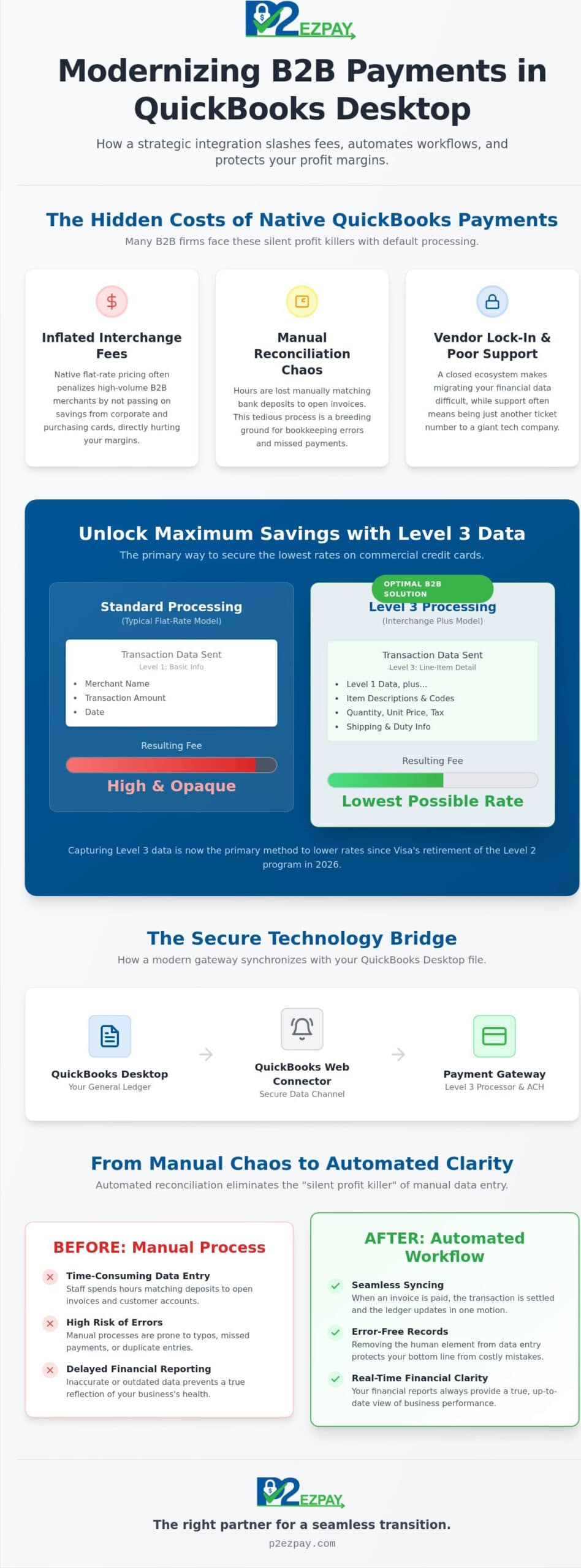
A professional QuickBooks Desktop payment integration acts as a vital bridge between your chosen payment processor and your general ledger. It ensures that when a client pays an invoice, the data moves securely into your accounting software without manual intervention. While Intuit’s native solution offers immediate convenience, it often locks high-volume merchants into a rigid ecosystem. This “convenience” comes with a price, particularly for businesses that handle significant corporate transaction volumes and require specialized handling.
For manufacturers and distributors in the Milwaukee and Madison area, complex invoicing is the standard, not the exception. These firms need more than a one-size-fits-all approach; they require systems that respect their data ownership and offer the flexibility to move between providers if service levels drop. Relying on a closed loop can lead to “vendor lock-in,” where migrating your financial data becomes a secondary hurdle to the primary goal of lowering costs.
The B2B Interchange Fee Gap
Corporate and purchasing cards carry higher interchange costs because they involve more risk and specific data requirements. Native QuickBooks payments typically use flat-rate pricing, which averages these costs upward to ensure the provider’s profit. In contrast, an Interchange Plus model allows you to see the true cost of every transaction. Since Visa retired its Level 2 program in January 2026, capturing Level 3 line-item data is the only way to qualify for the lowest possible rates on commercial cards.
Reconciliation: The Silent Profit Killer
When your processing and accounting systems don’t communicate, your staff spends hours matching bank deposits to open invoices. This manual process is where bookkeeping errors thrive, leading to missed payments or frustrating duplicate entries. Automated reconciliation is the primary driver for 2026 workflow efficiency because it settles transactions and updates your ledger in a single, seamless motion. By removing the human element from data entry, you protect your bottom line from the small errors that aggregate into significant losses over time. Our detailed QuickBooks automated payment posting checklist for 2026 outlines exactly how to implement these automated workflows and accelerate your invoice-to-cash cycle.
How Modern Payment Gateways Synchronize with QuickBooks Desktop
The technical foundation of a reliable QuickBooks Desktop payment integration rests on the QuickBooks Web Connector. This utility serves as the standardized communication channel between your desktop software and external financial services. It allows for secure data exchange without requiring you to open your firewall to potential threats. By utilizing this proven bridge, businesses maintain the integrity of their local financial records while benefiting from modern, cloud-based processing features.
Choosing between real-time and batch synchronization depends largely on your internal accounting policies. Real-time syncing offers immediate visibility, which is helpful for fast-moving inventory environments. Many B2B firms prefer batch syncing at the end of the business day instead. This approach provides a cleaner audit trail and simplifies the reconciliation of daily bank deposits. Security remains paramount; modern gateways utilize tokenization to ensure your local company file never stores sensitive credit card numbers, keeping your business within PCI compliance standards.
The Role of the Payment Gateway
A payment gateway functions as the digital translator between your banking institution and your accounting software. For complex corporate workflows, a gateway that supports ACH payment services is essential. This allows you to handle high-value transactions with lower overhead than traditional card networks. If you are unsure which gateway architecture fits your specific volume, speaking with a local advisor can clarify the best path forward for your team.
Data Mapping and Customization
Precision in B2B payment processing requires more than just recording a dollar amount. A sophisticated QuickBooks Desktop payment integration allows you to map incoming payments to specific general ledger accounts, customer jobs, or classes. This level of detail ensures that sales tax, shipping fees, and discounts are correctly attributed during the sync. When these elements align perfectly, your financial reports provide a true reflection of your business’s health without the need for manual adjustments.
Step-by-Step: Implementing Third-Party QuickBooks Desktop Payment Integration
Transitioning to a third-party QuickBooks Desktop payment integration requires a methodical approach to ensure your financial data remains accurate and secure. Before beginning the technical setup, you must audit your current software environment. As of 2026, Intuit has shifted its focus heavily toward subscription models, with significant price increases for QuickBooks Desktop Pro Plus and Premier Plus taking effect in February. Verifying that your specific version, whether it is a legacy Pro license or a current Enterprise subscription, is compatible with third-party plugins is the first essential step in avoiding software conflicts.
Phase 1: Selecting Your Partner
The success of your integration depends on choosing a provider that understands the nuances of corporate transactions. Consulting with a merchant services advisor prevents common integration headaches by identifying potential roadblocks before they impact your workflow. You should prioritize partners who offer dedicated Level 3 data support and provide local, Milwaukee-based technical assistance. Asking the right questions about their experience with high-volume B2B environments will ensure you aren’t left waiting for a callback from a generic support center when you need immediate help.
Phase 2: Technical Configuration
Once you have selected a partner, the technical configuration begins with the QuickBooks Web Connector. This process involves downloading a specific “.QWC” file from your gateway and authorizing it within your QuickBooks company file. This file establishes the secure handshake mentioned earlier, allowing data to flow without compromising your local security. You will need to establish sync intervals that align with your daily goals; some firms prefer a manual trigger at the end of the day, while others benefit from automated hourly updates to keep their accounts receivable current.
To finalize the implementation, follow these practical steps:
- Install the Plugin: Run the installer provided by your merchant partner while QuickBooks is open in single-user mode.
- Authorize the Handshake: Grant the necessary permissions within the QuickBooks “Integrated Applications” menu.
- Map Your Accounts: Direct payments to your specific “Undeposited Funds” or “Cash” accounts to ensure the ledger remains balanced.
- Perform a Test: Run a small test transaction to verify that the payment posts automatically to the correct open invoice.
If you are ready to modernize your workflow and reduce your processing overhead, schedule a technical consultation with our Wisconsin-based team today.
Maximizing ROI: Leveraging Level 2 and Level 3 Processing
Level 3 processing represents the highest standard of data transmission in the payment industry. It involves sending detailed line-item information, such as product codes, descriptions, quantities, and tax amounts, directly to the credit card networks with every transaction. For businesses utilizing a professional QuickBooks Desktop payment integration, this complex process occurs behind the scenes. The system automatically extracts the required data from your existing QuickBooks invoices, ensuring that every corporate or purchasing card transaction qualifies for the lowest possible interchange rate without extra work from your staff.
The financial impact of this technology is substantial for the bottom line. B2B firms throughout Wisconsin can reduce their interchange fees by up to 1.5% on eligible commercial transactions. When you consider the scale of high-volume corporate orders, these savings directly improve your operational cash flow and competitive positioning. This strategy is an essential component for those managing complex digital sales channels, as explored in our comprehensive guide on QuickBooks Integration for B2B Ecommerce.
Automating Data Capture
Manual entry of Level 3 data is a significant barrier for most accounting teams because it’s simply too time-consuming to type in every line item for every sale. The right integration removes this obstacle by mapping invoice fields to the payment gateway in real time. Automated data capture protects your profit margins on high-volume orders by ensuring you never miss a discount tier due to missing data or human error. It’s a technical safeguard that pays for itself through consistent fee reduction.
Wisconsin Business Spotlight
Consider the experience of a Milwaukee-based distributor that recently moved away from native QuickBooks payments. By implementing a specialized QuickBooks Desktop payment integration, they shifted from expensive flat-rate pricing to a transparent model that captured Level 3 data on every corporate purchase. This transition didn’t just lower their monthly overhead; it provided them with a local partner to monitor their processing health as their business volume scaled. Having a steady hand in the Milwaukee and Madison area ensures that technical questions are answered by experts who understand your specific regional business environment.
Modernizing Your B2B Financial Ecosystem
As the B2B landscape shifts in 2026, the need for precise financial control has never been more urgent. Relying on generic processing models can lead to unnecessary expenses and fragmented data. By adopting a professional QuickBooks Desktop payment integration, you move beyond the limitations of native ecosystems to embrace automated workflows and deep technical efficiency. This transition ensures your accounting remains accurate while your staff stays focused on high-value tasks rather than manual data entry.
Our team brings over 30 years of B2B payment expertise to every partnership. We specialize in Level 3 processing capability to help you capture every possible saving on corporate card transactions. With a local Wisconsin support team, we provide a steady hand to guide you through implementation and beyond. If you’re ready to secure your profit margins and streamline your operations, Schedule a Consultation with a Milwaukee Merchant Services Expert. We look forward to helping your business thrive in a complex digital economy.
Frequently Asked Questions
Is QuickBooks Desktop still supported for third-party payment integrations in 2026?
QuickBooks Desktop continues to support third-party payment integrations through the QuickBooks Web Connector in 2026. While Intuit stopped selling new subscriptions for Pro and Premier in late 2024, existing subscribers and all QuickBooks Enterprise users can still utilize external plugins. This allows your business to maintain its preferred desktop environment while accessing more competitive processing rates and specialized B2B features.
How does third-party integration differ from native QuickBooks Payments?
Third-party integration typically offers Interchange Plus pricing and Level 3 data support, whereas native QuickBooks Payments often relies on higher flat-rate models. This distinction is vital for B2B firms that process significant volumes on corporate cards. By choosing an independent provider, you gain better transparency into your fees and receive the personalized, local support that large tech corporations generally don’t provide.
Can I process ACH and e-checks through my QuickBooks Desktop integration?
You can absolutely process ACH and e-checks through a high-quality QuickBooks Desktop payment integration. These methods are frequently preferred for B2B transactions because they carry much lower overhead than standard credit card networks. Integrating these options directly into your software allows for the same automated reconciliation benefits as card payments, keeping your ledger balanced with minimal manual intervention.
Will switching payment processors cause me to lose my historical accounting data?
Switching your payment processor won’t affect your historical accounting data or existing records in any way. The integration only changes the pathway through which new transaction data flows into your company file. Your past invoices, payment history, and financial reports remain securely stored within your local QuickBooks file, ensuring total continuity for your bookkeeping and audit processes.
What are the specific requirements for Level 3 processing in QuickBooks Desktop?
Level 3 processing requires specific line-item details, such as product descriptions, quantities, and tax information, to be transmitted with the transaction. A sophisticated QuickBooks Desktop payment integration automates this requirement by pulling the necessary data directly from your invoices. This automation is essential for qualifying for the lowest possible interchange rates on commercial cards, particularly following the retirement of Visa’s Level 2 program in January 2026.